
Practical engineering guidance
One SOC, many tenants: Microsoft Sentinel with Azure Lighthouse
Azure Lighthouse lets one SOC operate across separate Microsoft Sentinel tenants while customer data, billing and ownership remain in each tenant. The design succeeds or fails on delegated scope, identity and role engineering.
Series: Security operations architecture
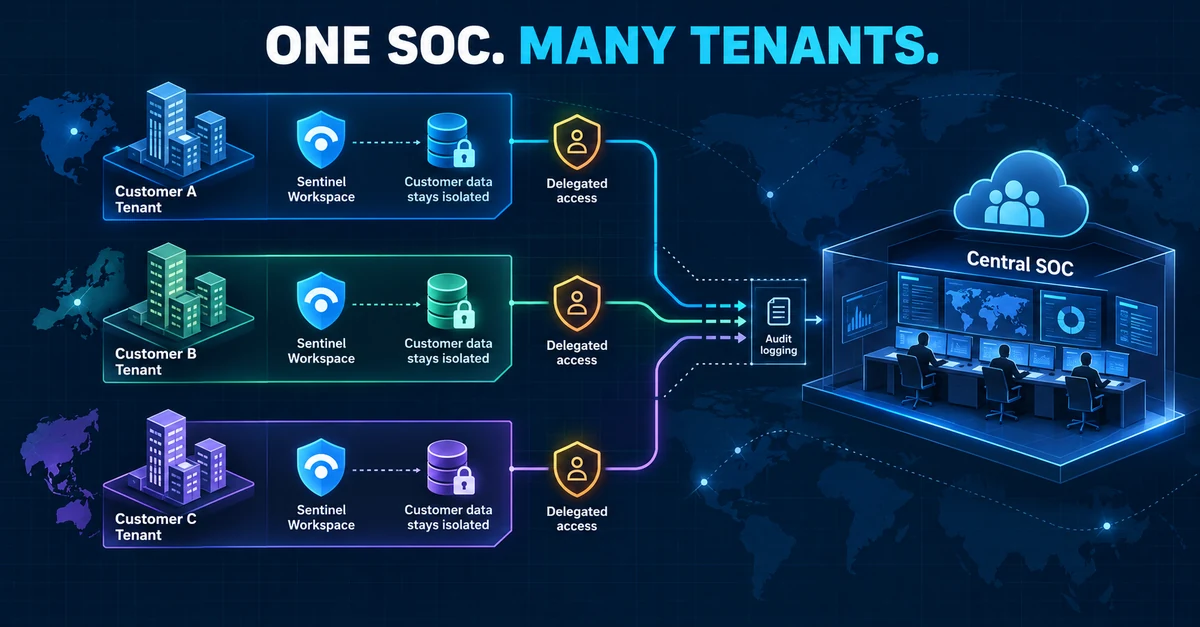
A central security operations centre does not require every tenant to send all of its logs to one shared workspace.
Azure Lighthouse provides another model. Each organisation or subsidiary keeps its Microsoft Sentinel workspace, data, retention settings and charges in its own tenant. Selected identities from a managing tenant receive Azure role-based access to the delegated subscriptions or resource groups. Analysts work across those projected resources without maintaining a separate account in every managed tenant.
That distinction matters. Azure Lighthouse centralises management access; it does not merge tenant boundaries, copy every log into a provider-owned workspace or give the managing tenant unrestricted ownership.
Where this architecture fits
The model is useful for:
- a managed security service provider operating Sentinel for several customers;
- a group SOC supporting subsidiaries with separate Microsoft Entra tenants;
- an organisation created through acquisitions that cannot yet consolidate tenants; or
- a regulated environment that requires local ownership and retention of security data.
It is less useful when all security data already belongs in one tenant and one workspace, or when the operating team cannot maintain consistent roles, content and response procedures across the managed environments.
The control-plane design
Azure Lighthouse creates two resources in the managed scope:
- A registration definition records the managing tenant and its authorised principals.
- A registration assignment applies that definition to the subscription or resource group.
Azure Resource Manager then projects the delegated resources into the managing tenant. An authorised analyst signs into the managing tenant, but actions against a managed resource are authorised against the Lighthouse definition. Those actions appear in the managed tenant’s Azure Activity Log.
The customer retains ownership and can remove the delegation. Sentinel data connectors continue to collect into the customer’s workspace. Data residency and workspace billing therefore stay with that customer.
1. Define the operating model before the template
Record these decisions for every managed tenant:
| Decision | Required answer |
|---|---|
| Managed scope | Subscription or selected resource groups |
| Data owner | Team accountable for the Sentinel workspace and retention |
| SOC owner | Team responsible for monitoring and incident handling |
| Reader group | Analysts who can investigate without changing incidents |
| Responder group | Analysts who can update incidents and run approved responses |
| Content group | Engineers allowed to change analytics, automation and content |
| Emergency removal | Managed-tenant owner who can remove the delegation |
| Evidence retention | Where activity logs, incident changes and approvals are retained |
Use Microsoft Entra security groups rather than individual analysts in Lighthouse authorisations. Membership then becomes the joiner, mover and leaver control. Separate investigation from content engineering; most Tier 1 analysts do not need Sentinel Contributor.
2. Collect identifiers without changing anything
In the managing tenant, obtain the tenant ID and the object IDs of the security groups that will receive delegated access:
Connect-AzAccount -Tenant '<MANAGING-TENANT-ID>'

$context = Get-AzContext
$readerGroup = Get-AzADGroup -DisplayName 'SOC-Sentinel-Readers'
$responderGroup = Get-AzADGroup -DisplayName 'SOC-Sentinel-Responders'

[pscustomobject]@{
    ManagingTenantId = $context.Tenant.Id
    ReaderGroupId    = $readerGroup.Id
    ResponderGroupId = $responderGroup.Id
}
In each managed tenant, record the subscription, resource group and Log Analytics workspace:
Connect-AzAccount -Tenant '<MANAGED-TENANT-ID>'
Set-AzContext -Subscription '<MANAGED-SUBSCRIPTION-ID>'

Get-AzOperationalInsightsWorkspace |
    Select-Object Name, ResourceGroupName, Location, CustomerId, ResourceId
Do not paste production tenant IDs, subscription IDs or group object IDs into a public repository. Keep environment values in an approved deployment parameter store.
3. Start with the minimum Sentinel roles
Microsoft provides three common built-in roles:
| Role | Role definition ID | Typical use |
|---|---|---|
| Microsoft Sentinel Reader | 8d289c81-5878-46d4-8554-54e1e3d8b5cb |
View incidents, data and content |
| Microsoft Sentinel Responder | 3e150937-b8fe-4cfb-8069-0eaf05ecd056 |
Investigate and update incidents |
| Microsoft Sentinel Contributor | ab8e14d6-4a74-4a29-9ba8-549422addade |
Create and change Sentinel content |
Begin with Reader and Responder groups. Add Contributor only to a small content-engineering group with a reviewed requirement. Playbook execution can require additional roles on the Logic App or its resource group; do not widen the entire subscription delegation to solve one automation permission.
4. Build the onboarding template
The managed tenant must approve and deploy the Lighthouse registration. The following parameter file illustrates a Reader and Responder delegation. It is intended for Microsoft’s Azure Lighthouse onboarding template, not as a complete standalone deployment:
{
  "$schema": "https://schema.management.azure.com/schemas/2019-04-01/deploymentParameters.json#",
  "contentVersion": "1.0.0.0",
  "parameters": {
    "mspOfferName": {
      "value": "Central SOC - Microsoft Sentinel operations"
    },
    "mspOfferDescription": {
      "value": "Delegated Sentinel investigation and incident response"
    },
    "managedByTenantId": {
      "value": "<MANAGING-TENANT-ID>"
    },
    "authorizations": {
      "value": [
        {
          "principalId": "<SOC-READER-GROUP-OBJECT-ID>",
          "principalIdDisplayName": "SOC Sentinel Readers",
          "roleDefinitionId": "8d289c81-5878-46d4-8554-54e1e3d8b5cb"
        },
        {
          "principalId": "<SOC-RESPONDER-GROUP-OBJECT-ID>",
          "principalIdDisplayName": "SOC Sentinel Responders",
          "roleDefinitionId": "3e150937-b8fe-4cfb-8069-0eaf05ecd056"
        }
      ]
    }
  }
}
Generate the base template from Azure Lighthouse > My customers > Create ARM Template, or use Microsoft’s maintained sample. Review the generated JSON and its parameters in source control, but keep production identifiers outside the public template.
5. Deploy from the managed tenant
An account in the managed tenant needs permission to create and remove role assignments, normally through Owner at the selected scope. For a subscription-level delegation:
Connect-AzAccount -Tenant '<MANAGED-TENANT-ID>'
Set-AzContext -Subscription '<MANAGED-SUBSCRIPTION-ID>'

New-AzSubscriptionDeployment `
    -Name 'lighthouse-central-soc' `
    -Location '<AZURE-REGION>' `
    -TemplateFile '.\delegatedResourceManagement.json' `
    -TemplateParameterFile '.\delegatedResourceManagement.parameters.json'
Use a unique offer name for each distinct delegation applied to the same scope. A separate deployment is required for each subscription. Resource-group delegation is possible, but confirm that every Sentinel and automation resource required by the SOC is inside the delegated scope.
6. Validate both sides of the trust
In the managed tenant, confirm the service provider entry and registration resources:
Get-AzManagedServicesDefinition
Get-AzManagedServicesAssignment
Then test with a dedicated analyst account from the managing tenant:
- Sign in to the managing tenant with phishing-resistant MFA where available.
- Open the delegated subscription or resource group.
- Open the customer’s Sentinel workspace.
- Confirm a Reader can query and view but cannot update an incident.
- Confirm a Responder can assign and change an incident but cannot alter unrelated Azure resources.
- Verify the managed tenant’s Activity Log records the cross-tenant operation and actor.
Test denial as deliberately as success. An analyst outside the delegated group should have no access. Removing an analyst from the group should remove the operational path after token and membership propagation.
7. Query across workspaces carefully
Cross-workspace queries help a central SOC hunt for the same behaviour in several customer workspaces. Use stable workspace IDs and include a source label so results retain their tenant context:
union withsource=SourceWorkspace
    workspace('<WORKSPACE-A-ID>').SecurityIncident,
    workspace('<WORKSPACE-B-ID>').SecurityIncident,
    workspace('<WORKSPACE-C-ID>').SecurityIncident
| where TimeGenerated > ago(24h)
| summarize Incidents=count() by SourceWorkspace, Severity, Status
| order by Incidents desc
Do not build a query that silently treats all customers as one security boundary. Carry the workspace, tenant and customer context into every result, workbook and handoff. Query limits and permissions still apply independently to each workspace.
8. Separate central content from customer data
Azure Lighthouse allows the managing tenant to retain intellectual property such as queries and playbooks while operating on managed workspaces. Decide where each artefact belongs:
- Customer tenant: logs, incidents, connectors, customer-owned watchlists and evidence.
- Managing tenant: reusable hunting logic, approved templates and provider-owned automation.
- Source control: versioned analytics, deployment definitions, tests and change history.
Microsoft Sentinel workspace manager can publish content across member workspaces, including cross-tenant workspaces when Lighthouse is enabled. It remains a preview capability as of this review, so treat it as an optional deployment mechanism rather than the security boundary.
9. Design automation as a separate trust path
A playbook can run in either the managing tenant or the managed tenant. Choose based on who owns the response and which resources it must change.
Before enabling automatic response, document:
- the Logic App and managed identity that execute the action;
- the exact tenant and resource scopes it can modify;
- whether an analyst approval is required;
- failure, timeout and retry behaviour;
- the evidence written back to the incident; and
- how the managed tenant can disable the automation independently.
Do not assume Sentinel Responder alone grants every playbook permission. Grant the automation identity only the resource actions it requires.
10. Protect the managing tenant as a privileged control plane
The managing tenant becomes an attractive target because one compromised identity may reach several delegated environments.
At minimum:
- require MFA, preferably phishing-resistant authentication, for all delegated operators;
- use Conditional Access in the managing tenant;
- separate Reader, Responder and Contributor groups;
- use eligible authorisations where supported and appropriate;
- review group membership and delegated scopes regularly;
- monitor sign-ins, group changes and Azure activity; and
- maintain tested emergency removal and customer-contact procedures.
A critical boundary deserves emphasis: Conditional Access policies in a managed customer tenant do not apply to managing-tenant users accessing resources through Azure Lighthouse. The managing tenant’s policies protect those identities. Customers should validate that control before approving a delegation.
11. Test offboarding before production
The managed tenant must be able to remove the delegation without depending on the managing SOC. Test the procedure in a non-production subscription:
- Export the registration definition and assignment details.
- Remove the assignment from Service providers or through the approved deployment process.
- Confirm projected resources disappear from the managing tenant.
- Confirm customer workspaces, data connectors, incidents and data remain intact.
- Re-onboard with a reviewed template and verify access again.
Offboarding should remove delegated access, not delete the customer’s Sentinel workspace or its data.
Readiness checklist
- Each tenant retains an owned Sentinel workspace and retention policy
- Delegated scope is documented and no broader than required
- Reader, Responder and Contributor duties are separated
- Security groups are used instead of individual authorisations
- Managing-tenant MFA and Conditional Access are enforced
- Cross-tenant actions are visible in the managed tenant’s Activity Log
- Queries preserve workspace and tenant context
- Automation identities have separately reviewed permissions
- Customer-controlled offboarding has been tested
- Access reviews and evidence-retention intervals are scheduled
What Azure Lighthouse does not solve
It does not create one universal incident queue with identical permissions everywhere. It does not normalise different customer schemas, standardise response authority or fix inconsistent content. It also does not replace agreements covering data processing, incident ownership, notification and evidence handling.
Azure Lighthouse supplies the delegated control-plane path. A reliable multi-tenant SOC still depends on identity governance, least privilege, common operational standards and evidence that the separation works.
Verification and limitations
The architecture, role IDs and commands were reviewed against Microsoft documentation available on 12 October 2026. The examples contain placeholders and were not deployed against customer tenants. Portal labels, permissions and preview features can change. Validate the complete Reader, Responder, Contributor, query, automation and offboarding paths in a non-production subscription before approving production access.
Microsoft references
- Manage Microsoft Sentinel workspaces at scale with Azure Lighthouse
- Azure Lighthouse architecture
- Onboard a customer to Azure Lighthouse
- Prepare for multiple workspaces and tenants in Microsoft Sentinel
- Azure Lighthouse recommended security practices
- Azure built-in roles for security
- Manage multiple Sentinel workspaces with workspace manager
Reader feedback
Was this article useful?
No ratings yet. Be the first to rate this article.