
Practical engineering guidance
Microsoft Sentinel data lake: what the SOC should keep hot
Microsoft Sentinel now separates fast operational analytics from lower-cost long-term security retention. The difficult decision is not enabling the lake; it is deciding which telemetry must remain available for immediate detection.
Series: Security operations architecture
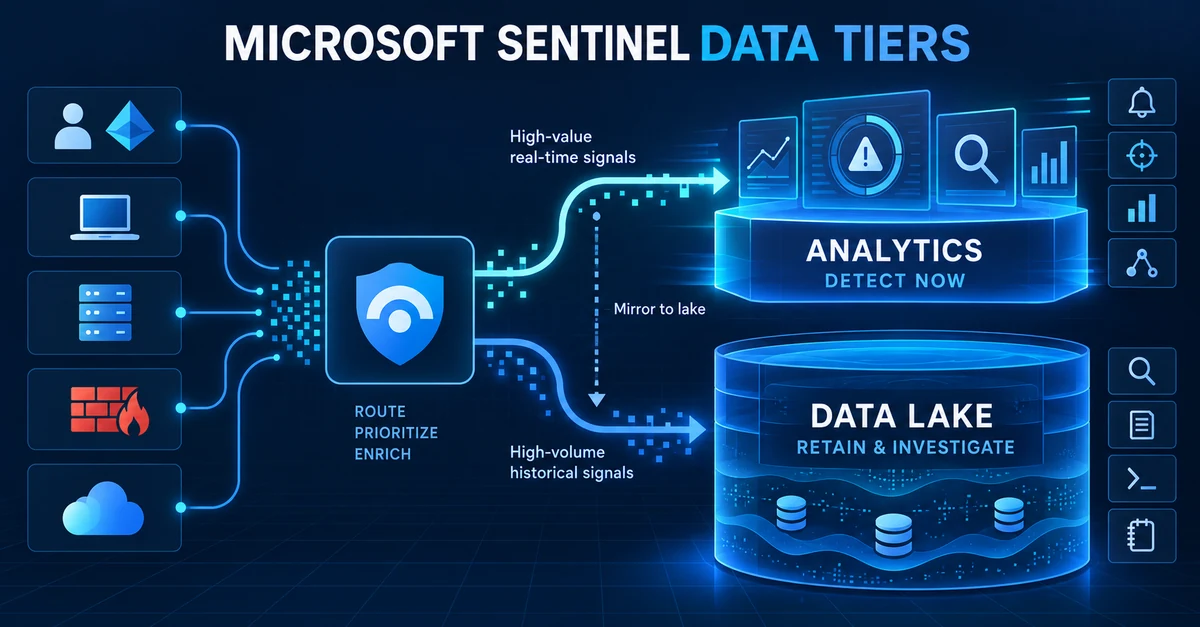
The Microsoft Sentinel data lake changes a decision that SOC teams have made for years. The question is no longer simply which logs should we ingest? It is now which logs must remain immediately available for detection, and which logs only need to remain available for later investigation?
That is a useful distinction. Authentication failures, endpoint activity and privileged changes may need to trigger an alert within minutes. High-volume firewall allow events may be valuable six months later when an investigator reconstructs an attack, but keeping every one of them in the fastest tier can consume a disproportionate part of the SIEM budget.
Microsoft Sentinel now provides two complementary storage tiers:
- the Analytics tier for alerting, advanced hunting, workbooks and normal SOC operations; and
- the Data Lake tier for lower-cost, long-term retention, historical analysis, KQL jobs and notebooks.
The lake is not a cheaper copy of every Sentinel feature. Data stored only in the lake cannot drive real-time analytics rules or custom detections. A cost-saving change that moves the wrong table can therefore remove detection coverage while leaving the connector apparently healthy.
Begin with the control that consumes the data
Do not classify a table by its size alone. Start with every operational dependency that reads it:
- scheduled analytics rules and custom detections;
- near-real-time rules;
- hunting queries used during active incidents;
- workbooks and operational dashboards;
- automation rules and playbooks;
- parsers, functions and watchlist correlations;
- regulatory retention and forensic requirements; and
- periodic reporting, trend analysis and data-science workloads.
If a production detection queries a table, that table normally needs Analytics-tier data for at least the rule’s lookback period plus its observed ingestion delay. If the data is used only for a quarterly investigation or an annual audit, the lake may be the better home.
The first inventory can be simple:
| Table or source | Operational use | Required response | Likely placement |
|---|---|---|---|
| Entra sign-ins and audit | Identity detections and investigations | Minutes | Analytics, then retain in lake |
| Active Directory security events | Credential and privilege detections | Minutes | Analytics, then retain in lake |
| Defender XDR telemetry | Detection, hunting and incident context | Minutes | Analytics/XDR default, then lake |
| Privileged Azure activity | Control-plane detections | Minutes | Analytics, then retain in lake |
| DNS and proxy | Detection plus historical scoping | Minutes to months | Split by use and fidelity |
| Firewall deny and threat events | Immediate detection | Minutes | Analytics, then retain in lake |
| Routine firewall allow events | Long-term forensics and trends | Hours to years | Candidate for lake-only ingestion |
| Application diagnostic detail | Troubleshooting or compliance | Hours to years | Often a lake candidate |
This table is a starting point, not a universal policy. A DNS table used by a production command- and-control rule belongs in Analytics even if it is expensive. An identity feed with no detection, hunting or response use may not justify premium placement merely because identity is important.
Understand what each tier provides
The Analytics tier is Sentinel’s operational tier. It provides high-performance queries and the features analysts expect during an incident: analytics rules, alerting, hunting, workbooks and integrated response. Microsoft documents 90 days of included retention for Microsoft Sentinel solution tables and 30 days for Defender XDR hunting data, with service-specific cost rules and options to extend retention.
Data in Analytics is mirrored into the data lake. Total retention can then extend the data-lake copy for up to 12 years. This supports a common design: keep enough recent data hot to operate the SOC, then keep the same evidence longer in the lake for investigations and compliance.
Lake-only ingestion is different. It lowers the cost of bringing in high-volume, lower-urgency telemetry, but the data does not participate in real-time detections. It is queried through lake KQL, KQL jobs or notebooks, and query or compute use is billed separately.
The practical model is:
Time-sensitive, detection-critical telemetry
    -> Analytics tier
    -> automatically mirrored to the data lake

High-volume, low-touch historical telemetry
    -> Data Lake tier only
    -> query or summarise when required
1. Establish a measured baseline
Before changing a tier, record at least 30 days of:
- daily ingestion volume by table;
- the latest record received;
- the rules, workbooks and functions that reference each table;
- interactive queries against the table;
- retention and regulatory requirements; and
- an estimated monthly cost for ingestion, retention and historical queries.
In the Microsoft Defender portal, open Microsoft Sentinel > Data management > Tables and use Table insights to review ingestion volume, day-over-week changes, the latest data received and estimated daily ingestion cost. Microsoft describes Table insights as an investigation view, not a billing-grade source, so reconcile it with Azure Cost Management before approving a forecast.
Use KQL to confirm volume and freshness from the data itself:
union withsource=TableName isfuzzy=true
    SigninLogs,
    AuditLogs,
    AzureActivity,
    SecurityEvent,
    CommonSecurityLog
| where TimeGenerated > ago(30d)
| summarize
    Records = count(),
    FirstRecord = min(TimeGenerated),
    LatestRecord = max(TimeGenerated),
    EstimatedGB = sum(_BilledSize) / 1024 / 1024 / 1024
    by TableName, bin(TimeGenerated, 1d)
| order by TimeGenerated desc, EstimatedGB desc
_BilledSize is useful for comparison but is not a replacement for the invoice. Some data types
are free, some are transformed, and Sentinel pricing depends on the service and commitment model.
2. Map every rule to its tables
Export or review all active analytics rules. For each query, record the tables it reads, its frequency, lookback window and business owner. Repeat this for workbooks, hunting queries, automation and saved functions.
This dependency map prevents the most damaging error: moving a table to lake-only ingestion while a rule still expects it in the operational query surface.
For a candidate table, run a small coverage check against the rules you believe depend on it:
CommonSecurityLog
| where TimeGenerated > ago(7d)
| summarize
    Events = count(),
    Devices = dcount(DeviceName),
    Vendors = make_set(DeviceVendor, 20),
    LatestEvent = max(TimeGenerated)
Then run the actual production detection query over its normal window. Preserve the result count and representative alerts as the before-state for later validation.
3. Choose the tier by detection value
Keep a source in Analytics when one or more of these are true:
- an enabled rule must alert on it;
- analysts routinely query it during the first hours of an incident;
- a workbook or response workflow depends on current data;
- delayed access would materially increase containment time; or
- it provides a high-fidelity signal that is difficult to reconstruct.
Consider lake-only ingestion when all of these are true:
- no real-time rule or operational control depends on it;
- the data is primarily retained for historical investigation, audit or trend analysis;
- slower, billed queries are acceptable; and
- the organisation has tested how analysts will retrieve it during an incident.
Do not classify an entire product blindly. One firewall can produce high-value threat and deny events alongside enormous volumes of routine allow traffic. Microsoft Sentinel supports filter and split transformations so selected records can remain in Analytics while the remainder goes to the lake. Data selected for Analytics is also mirrored to the lake.
For example, the business intent for firewall data might be:
Keep in Analytics:
- threat, malware and intrusion-prevention events
- administrative configuration changes
- blocked inbound traffic to protected services
- outbound traffic matching a monitored destination category

Send to lake only:
- routine permitted flows needed for retrospective investigation
- repetitive health and informational events with no detection use
The exact transformation must use the schema and semantics of the device connector. Test the combined effect of existing Data Collection Rule transformations and the Sentinel transformation; conflicting filters can discard data entirely.
4. Change one table at a time
In the Defender portal:
- Open Microsoft Sentinel > Data management > Tables.
- Select the target workspace and table.
- Review Table insights, existing tier and retention.
- Confirm that the table is supported for the proposed setting.
- Configure Analytics retention and total retention, or select lake-only ingestion where appropriate.
- Record the approver, previous setting, new setting and rollback condition.
- Apply the change to one low-risk table first.
Portal labels and availability can differ by region and onboarding date. Customers onboarding after 23 September 2026 should follow Microsoft’s integrated Sentinel SIEM and data-lake onboarding guidance.
Do not make several large changes simultaneously. A single-table pilot makes it possible to attribute a missing alert, unexpected cost or query limitation to the correct decision.
5. Validate operational coverage
After the change, confirm four separate outcomes.
Ingestion
Verify that the latest event continues to advance and that volume remains within the expected range. Compare connector health with actual table records; a connected status does not prove that the expected events arrived.
Detection
Run an approved test that previously produced a known result. Confirm that rules using Analytics-tier data still execute and that their incidents contain the expected entities and evidence.
Historical access
Run a tightly scoped lake query over a known period. Lake queries are charged by uncompressed data scanned, so constrain time and project only required columns:
CommonSecurityLog
| where TimeGenerated between (datetime(2026-09-01) .. datetime(2026-09-08))
| where DeviceAction in ("Deny", "Blocked")
| summarize Events = count() by SourceIP, DestinationIP, bin(TimeGenerated, 1h)
| order by Events desc
Microsoft currently documents tenant-wide lake-query limits including 30 queries per minute, 10 concurrent queries, a four-minute timeout, 500,000 rows and 64 MB of result data. Design automated jobs to remain inside the current published limits rather than assuming an interactive query is an unbounded archive search.
Cost
Review ingestion, storage, query and notebook compute after a complete billing period. Lake cost is not only storage: direct lake ingestion, processing, data scanned by KQL and advanced notebook compute can each contribute. A lower storage rate does not guarantee a lower total cost if jobs repeatedly scan wide time ranges.
6. Create summaries instead of repeatedly scanning raw history
When the SOC needs a daily or weekly trend rather than individual raw records, use a scheduled KQL job or summary rule to aggregate the lake data into a smaller table. A conceptual daily summary is:
CommonSecurityLog
| where TimeGenerated >= startofday(ago(1d))
| where TimeGenerated < startofday(now())
| summarize
    Events = count(),
    UniqueSources = dcount(SourceIP),
    UniqueDestinations = dcount(DestinationIP)
    by DeviceVendor, DeviceProduct, DeviceAction, bin(TimeGenerated, 1h)
The job destination can be an Analytics table when the summary must support a rule or dashboard,
or a lake table when it remains historical. Tables created directly in the lake by the job wizard
use the _KQL suffix. Keep the raw evidence for investigation and operate day-to-day reporting on
the smaller result.
7. Define rollback before optimisation
Rollback should be triggered when:
- an analytics rule can no longer read required records;
- incident investigation takes materially longer;
- a required workbook or response process fails;
- lake queries cannot return evidence within the agreed investigation time; or
- measured total cost exceeds the approved forecast.
Restoring a table to Analytics helps future events; it may not instantly make all previously lake-only history available to every Analytics feature. Microsoft supports KQL and notebook jobs that promote selected data into the Analytics tier. Test this process before an incident requires it.
A practical 30-day rollout
Week 1 — inventory. Measure table volume and freshness, export rule dependencies and identify the five largest tables.
Week 2 — classify. Meet detection owners and data owners. Mark every candidate as Analytics, lake-only or split, and document the reason.
Week 3 — pilot. Change one low-risk table, retain the rollback path and run ingestion, detection and historical-query tests.
Week 4 — measure. Compare incident workflow, query performance and actual cost. Approve the next small group of changes only if the pilot met its service objectives.
The architecture decision
The data lake is valuable because it lets a SOC retain more security context without requiring every event to live permanently in the operational tier. It does not remove the need to decide which signals protect the organisation in real time.
Keep detection-critical telemetry hot. Retain high-volume historical evidence in the lake. Split mixed-value sources when their schema permits it. Measure both coverage and cost after every change.
The successful design is not the one with the lowest ingestion bill. It is the one that preserves the evidence and response speed the SOC has agreed to deliver, at a cost the organisation can explain.
References
- Manage data tiers and retention in Microsoft Sentinel
- Microsoft Sentinel data lake overview
- Which logs to ingest directly into the Microsoft Sentinel data lake
- Run KQL queries against the Microsoft Sentinel data lake
- Create KQL jobs in the Microsoft Sentinel data lake
- Transform data using filter and split in Microsoft Sentinel
- Plan Microsoft Sentinel costs and understand billing
- What’s new in Microsoft Sentinel
Reader feedback
Was this article useful?
No ratings yet. Be the first to rate this article.